USB-C Fast Charging Standards Showdown: PD, PPS, or SuperVOOC—Which One Actually Matters
A USB-C port alone doesn't guarantee fast charging speeds—what actually determines charging efficiency is PD, PPS, and each brand's proprietary protocols. From the iPhone 17 to the Galaxy S26 Ultra, here's a breakdown of which spec actually matters.
Every USB-C port looks the same, but what happens after you plug in can be worlds apart. Same cable, same port—yet one phone can hit 60% battery in half an hour while another crawls along like it's dripping electrons. The bottleneck isn't the connector itself but the protocol running behind it—USB PD, PPS, SuperVOOC, HyperCharge—names that all seem to claim they're the fastest. But here's the truth: plugging a phone that only supports 20W into a 100W charger doesn't magically conjure up 100W out of thin air.
USB Power Delivery (USB PD) is currently the closest thing to a universal standard, used across phones, tablets, laptops, and even some handheld gaming devices. The spec itself keeps getting bumped up too: USB PD 3.1 pushed maximum supported power to 240W, while PD 3.2 is the latest revision. But these high-wattage numbers are aimed at laptops and monitors—phones neither need nor can handle them, since cranking up the power just means heat dissipation problems kick in first. Stuffing 240W into a phone simply isn't realistic. The iPhone 17 lineup sticks to this USB PD path, while Samsung and Google phones layer PPS on top of PD.
What Is PPS, and Why Do the Galaxy S26 Ultra and Pixel 11 Pro Both Need It
PPS, short for Programmable Power Supply, is a more advanced function built into USB PD that lets devices request finer-grained voltage and current adjustments during charging, improving efficiency and helping manage temperature. Samsung's Galaxy S26 Ultra runs its 60W "Super Fast Charging 3.0" system on top of PPS; Google's Pixel 11 lineup also relies on USB-C PPS to hit its top rated speeds, with the Pixel 11 Pro designed to pair with a 45W PPS charger. In other words, if you're rocking an Android flagship and looking for a universal charger, going with "PD plus PPS" is essentially a safe bet.
As for Qualcomm Quick Charge, once one of the earliest fast-charging systems in the Android camp, it's now been largely overtaken by USB PD—to the point where even the newest version of Quick Charge itself needs to support USB PD. Having a Qualcomm chip inside doesn't mean a phone necessarily uses Quick Charge, either—manufacturers are free to go with other fast-charging schemes entirely. OnePlus and Oppo use SuperVOOC-family tech, while some Xiaomi models run HyperCharge. To hit the top rated speeds these proprietary protocols promise, you'll typically need to pair the phone with its dedicated charger—and in many cases, even a specific cable. Most of these phones also support standard USB-C PD charging, just at noticeably lower speeds than their proprietary-protocol ratings. And don't take those marketed 80W or 100W numbers at face value either—phones don't charge at full power the entire time. They usually blast through the fastest charging when battery is low, then taper off quickly as the charge level climbs.
Does Fast Charging Damage Your Battery? Temperature Management Matters More Than the Protocol Name
Lithium batteries degrade over time, and heat from fast charging does speed up that process—but modern phones are designed with countermeasures built in: monitoring temperature, cutting power when necessary, and gradually tapering charging speed as the battery nears full. So there's no need to be overly worried that fast charging will wreck your battery's long-term lifespan. On the flip side, if you're not in a rush, fast charging offers no extra benefit—under the same conditions, a slower charge that keeps temperatures in check is actually gentler on the battery.
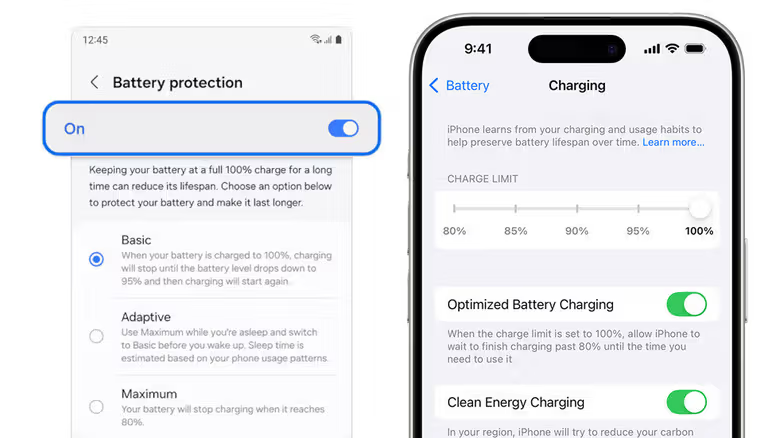
What actually affects battery lifespan is temperature management and charging habits—not which fast-charging protocol you're using. Avoid leaving your phone sitting at full charge for extended periods, and don't charge a phone that's already running hot under direct sunlight. The Galaxy S26 series, for example, has a gaming mode setting that pauses charging, letting the wall outlet power the device directly during gameplay without putting extra strain on the battery, keeping the charge level steady without added stress. Making good use of your phone's built-in battery protection features matters too: Apple's Optimized Battery Charging learns your usage patterns and delays charging past 80% when it predicts the phone will stay plugged in for a long stretch—iPhone 15 and later models even let you customize the charging cap anywhere between 80% and 100%. Samsung has Battery Protection, and Google Pixel offers Charging Optimization, which includes Adaptive Charging and an 80% cap option.
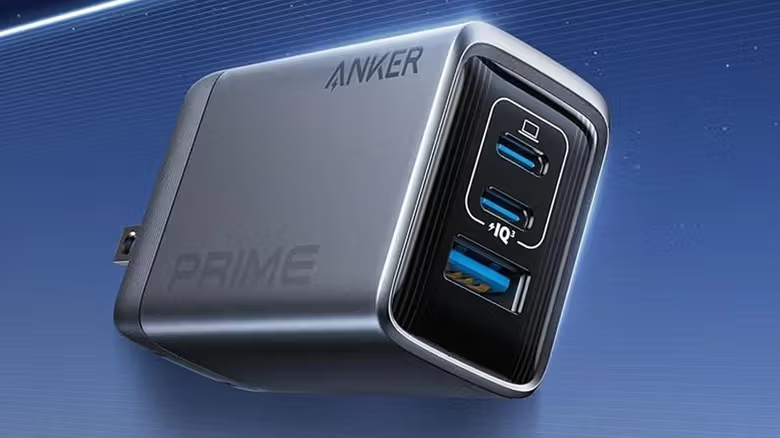
If you just want one charger to cover all your devices, look for one that supports USB-C Power Delivery with PPS and enough wattage to handle your most power-hungry gadget—that's currently the most broadly compatible option. It won't get OnePlus, Oppo, or Xiaomi phones running at their proprietary-protocol top speeds, but at least you won't need a separate charger for every single device.