Bought the Wrong Game by Mistake? Xbox's Refund System Isn't as Hard as You Think
Trailer misled you, bought the wrong edition, or got charged for a subscription you forgot about—Xbox actually has refund channels for all of these. Here's a breakdown of the 14-day, 90-day, and 30-day windows, plus how long refunds actually take to process.
Trailers cut better than the actual game—this happens all the time on the Xbox store. Buying the wrong edition, accidentally clicking to renew a subscription, or straight up forgetting what you signed up for—these are the annoying parts of digital purchases: there's no physical receipt to bring back to a counter. But Microsoft has actually left a few backdoors open, the rules are just scattered across different time windows, and if you don't know them well, you can easily waste your trip.
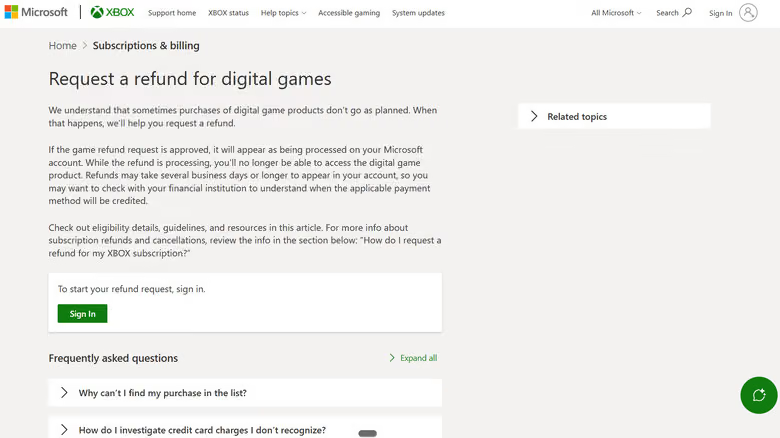
Refund requests aren't done through the Xbox console interface—you need to log into your account on the Xbox Support website, select the game or purchase you want refunded, hit "Request a refund," fill in the reason, and submit. Once the system approves it and processing begins, the digital license for the game gets revoked.
The time window is the core of this whole system. According to Xbox's official stance, if you request a refund within 14 days of purchase and haven't racked up "significant" playtime, the refund will usually go through—but Microsoft hasn't disclosed a specific hour threshold, meaning there's no guaranteed safe amount of playtime. Even past 14 days, you can still submit a request within 90 days, though approval isn't guaranteed, and Microsoft reserves the right to limit the number, type, and amount of refunds per account each year.
This policy covers digital games on the Microsoft Store, Xbox apps (excluding movies and TV), game bundles, durable in-game content, and some consumable content. Most in-game consumables and virtual currency become non-refundable once purchased or used. Pre-order games follow different rules: within 10 days before release, you can cancel directly from your order history, but once the charge goes through, you'll need to file a refund request instead.
Subscription Refunds: Turning Off Auto-Renew ≠ Getting Your Money Back
The refund logic for subscriptions is a bit more convoluted. Simply turning off auto-renewal only stops the next charge—your current subscription period will still run until it expires. If you just want to stop future charges, canceling or downgrading your Xbox Game Pass subscription is enough.
But if you want to get back money from a charge that's already gone through, the rules get more specific. Under the standard policy, a subscription is eligible for a refund within 30 days of the first purchase, or before the first recurring billing date—whichever comes first. The most recent recurring charge may also qualify for a refund, provided you request cancellation within 30 days of that charge, and Microsoft limits this right to once per account per Xbox subscription product. If eligible, the system will offer a "Cancel and refund now" option—but note that prepaid card codes follow retailer-specific rules, and some countries have separate pro-rated refund rights.
Refunds don't hit your account instantly, either. Microsoft states that processing a request can take up to 72 hours, and once the refund is approved, the money is typically returned to the original payment method within another 3 to 5 business days—actual arrival time depends on how fast your bank or payment provider processes things. In other words, if Xbox's system already shows the refund as complete but the money hasn't shown up in your account yet, the one to contact is your bank, not resubmitting the same refund request—rejected cases can be appealed by replying to the decision email, but you can't submit the same refund request twice through the page.