How to add and delete Apple Wallet cards? Credit cards and coupons are actually two sets of logic.
Credit cards can be added to Wallet with just one click of a scan, but coupons and membership cards are subject to the issuer’s decision. Understand the difference between these two sets of logic so that you won't be in a daze at the blank Wallet menu.
Open Wallet on iPhone and press the "+" in the upper right corner. You may think that all cards follow the same process. In fact, there are two completely different sets of rules hidden here: one is decided by Apple itself, and the other depends on whether the store or card issuer has nod.
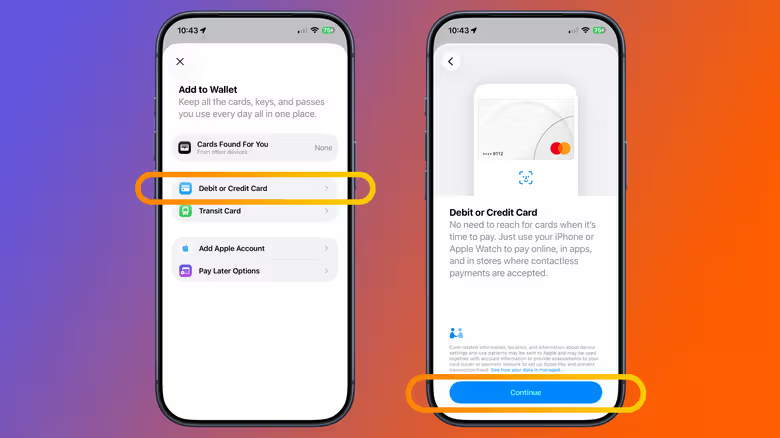
Credit cards and debit cards take the most direct route. Open Wallet, click "+", select "Debit or Credit Card", put the physical card close to the iPhone sensor, or enter the card number manually, and the system will complete the process and you can use it. Wallet will even list your previously used cards so you can add them again. The premise is that the issuing bank of this card itself supports Apple Pay, and the bank will usually require an additional verification before releasing it. If you still can't add a card, Apple's advice is straightforward: call the card company.
From the same "+" menu, transportation cards, driver's licenses and identity documents can also be added from here, and some items can also be called directly from the "From Apps on Your iPhone" menu. But if you want to use Apple Pay on your Apple Watch, iPad or Mac, the cards added to your iPhone will not be automatically synced - each device will have to be set up separately.
Membership cards, tickets, coupons: there is no such thing as "entering your card number"
Except for credit cards and debit cards, everything else in Wallet is classified as "pass" - membership cards, coupons, gift cards, boarding passes, movie tickets, and concert tickets all count. There is no universal "enter any merchant's membership card number" option here. Everything depends on whether the party issuing the card or invoice supports Apple Wallet's pass format.
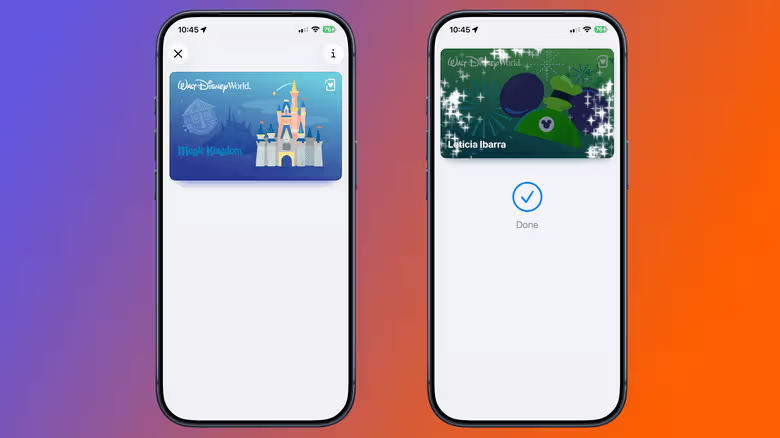
Supported passes may come from App, official website, email, QR Code or AirDrop. As long as you see the "Add to Apple Wallet" button, click on it and follow the instructions - for example, Ticketmaster's app will provide the option to add tickets, or this button will be hidden in the movie ticket confirmation letter. If you can't find this option at all, Apple's answer is still the same: contact the invoice company.
The exception is the Apple Gift Card. If your Apple Account card is already in Wallet, open it, click "More" and then select "Redeem", scan the gift card or manually enter the 16-digit code. The money will go directly into your Apple Account balance instead of turning into another independent gift card in Wallet.
Deleting cards and deleting tickets are two different actions.
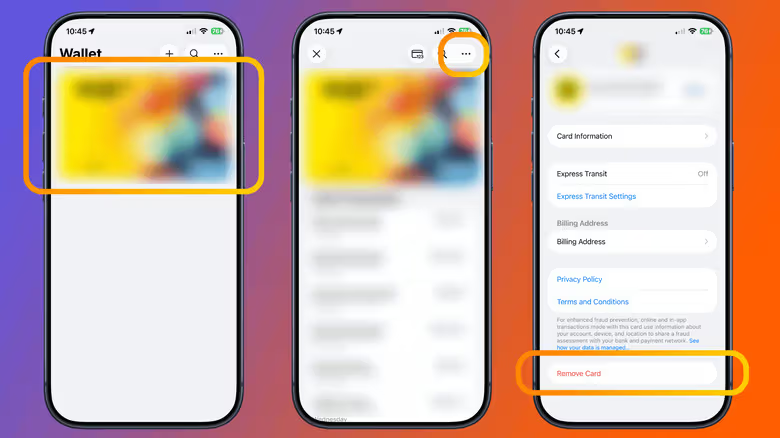
Remove a credit or debit card: Open Wallet, select the card, click the three-dot button, select "Card Details", and then click "Remove Card". This action will only remove the card on the current iPhone, and the same card on your other devices will not disappear.
The logic of Pass is exactly the opposite. Select the pass, click the three-dot menu, and select "Remove Pass" - this time it is permanently deleted, and the same pass in the Wallet of your other devices will also be removed. Some expired passes will not be deleted directly, but will be automatically hidden. You can retrieve them from "Expired" in the three-click menu and decide whether to restore them or delete them completely.
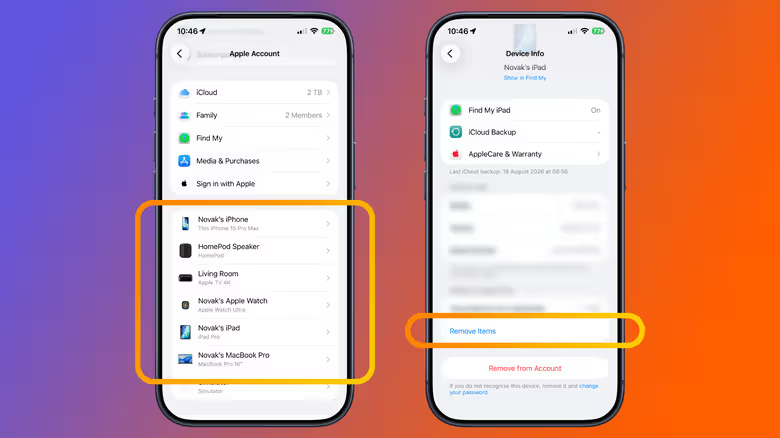
There is another situation: the mobile phone is really missing. As long as Find My was turned on before the iPhone was lost, you can use another iPhone or iPad to log in to the same Apple Account, open Settings, click your name, select the missing iPhone, and click "Remove Items" under "Wallet & Apple Pay". You can also log in to Apple Account through a browser to perform the same operation, or call the card-issuing bank directly for processing. Marking the phone as lost will also suspend all cards and passes bound to Apple Pay on the device.