Claude Code adds /design command, turning design mockups straight into code in the terminal
Anthropic updated Claude Code on August 18, 2026, adding a /design command that generates multiple editable artboards directly in the terminal and syncs them into code, skipping the export-and-paste step. The feature is still in research preview.
Using AI for interface design has always had one clunky step baked in: generate the image in a separate tool, export the file, switch back to your code editor, then paste it in and rewrite it. This Claude Code update removes exactly that step.
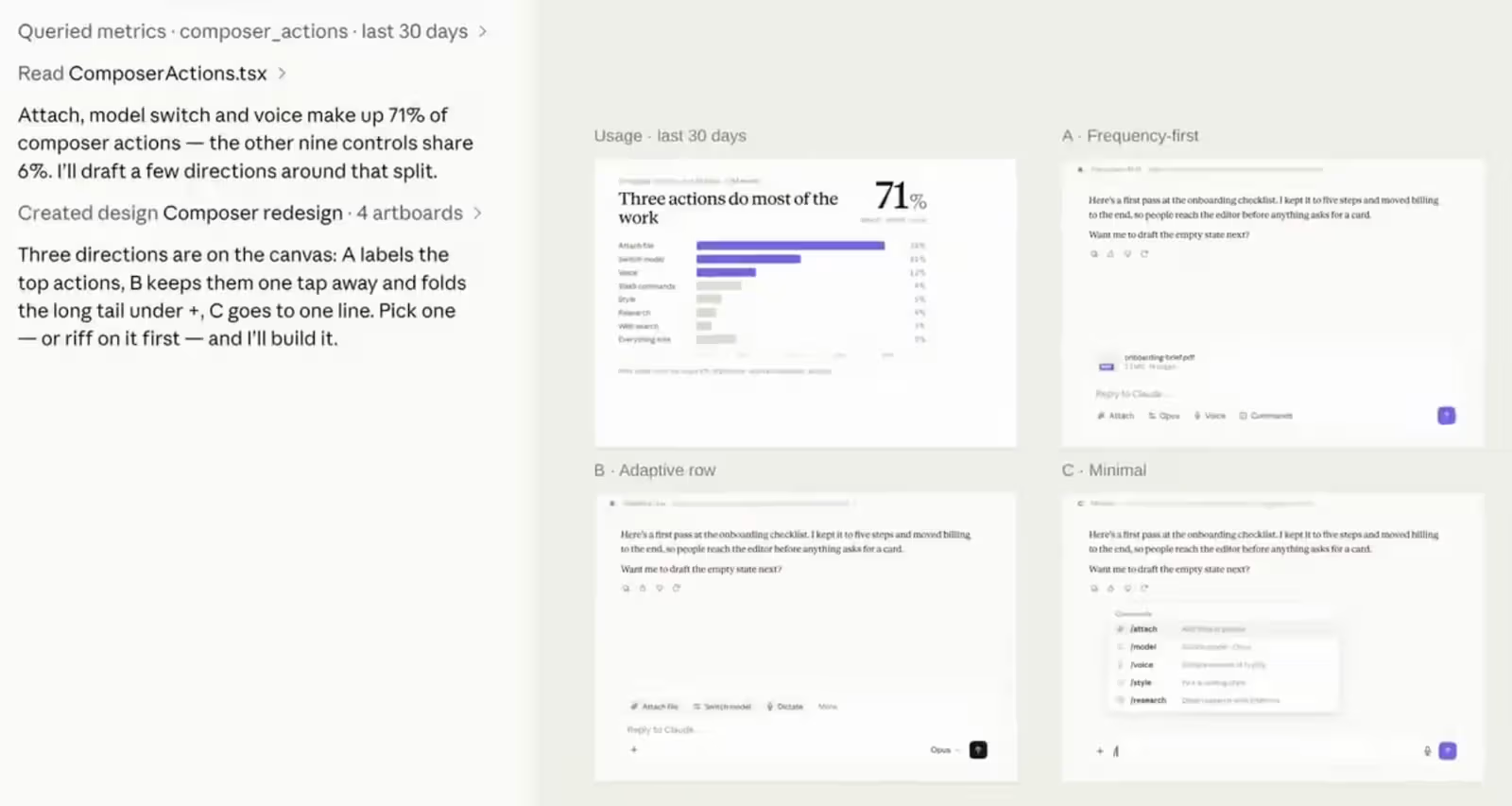
Anthropic announced on August 18, 2026 (Taiwan time) that Claude Code now includes a /design command. Simply type "/design a few options for {feature name}" and it generates several editable interface artboards right in the terminal in one go. Once you pick one, you can click on components directly on the canvas, adjust styling through a properties panel, edit text inline, and even undo/redo changes. Hitting Save publishes a new version; without save permissions on the account, you can only view the layout or export it as PNG/PDF—no actual editing.
Anthropic engineer Nate Parrott demoed the command on X on August 17, explaining that Claude first reads the existing codebase and checks it against the project's current UI style before producing a shareable mockup. In other words, once an artboard is selected, Claude Code continues writing code in the same session—no extra export-and-paste round trip required. The feature is currently in research preview, supporting both the CLI terminal and desktop app, and requires running claude update first to unlock it.
From standalone workspace to governance platform, and now baked into the terminal command line
Rewind to April 17, 2026: Anthropic Labs launched Claude Design as a standalone product—a visual workspace for creating mockups, prototypes, presentations, and one-page copy alongside Claude, powered by Claude Opus 4.7 and also released as a research preview. It topped 1 million users in its first week. Two months later, on June 17, Claude Design got a major overhaul, adding a capability it had been missing: importing existing design systems from GitHub repos, design files, raw uploads, or a local codebase. After generating an image, Claude would cross-check its own output against that system and self-correct before showing it to the user. Anthropic described the update as turning Claude Design from "a quick mockup tool" into "a governed workspace for brand, design, and development work."
First came the standalone workspace to validate demand, then governance mechanisms were added to control cost and quality, and now the final confirm-and-generate action has been folded directly into Claude Code's command line—three moves that got us here.
That said, /design's limitations are spelled out clearly: artboards only stick around if you manually save them—skip Save and the work is gone; the interface itself still feels a bit rough, not a fully polished stable release; the generation process eats up tokens too, adding extra context overhead to a session that's already busy writing code. More importantly, it doesn't guarantee automatic inheritance of a project's existing design tokens and components—manual specification is often still required. The scope is also fairly narrow, working best for single-feature designs; for multi-screen flows, Anthropic still recommends going back to the web version of Claude Design.